


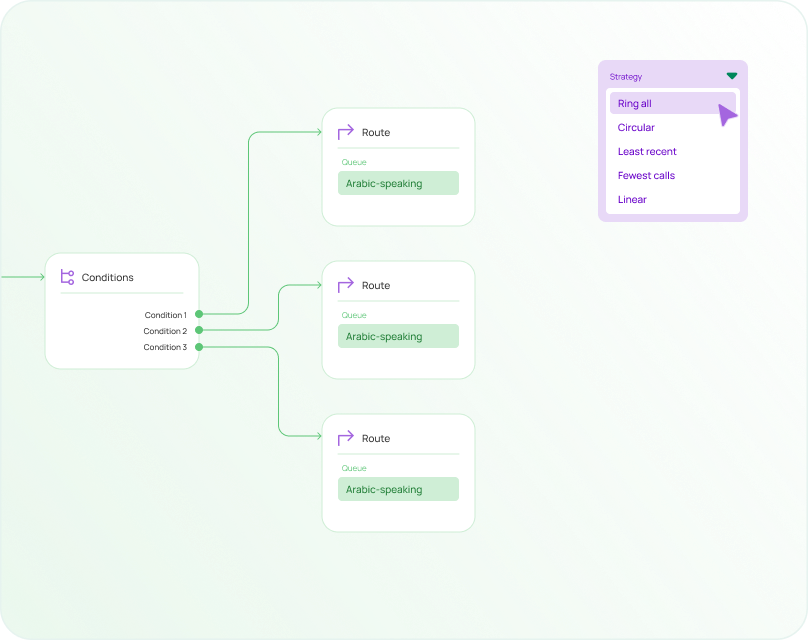
A call flow builder is an interactive visual designer that lets teams create, edit, and deploy custom call flows without writing code. It is the tool that maps how incoming calls are greeted, routed, queued, transferred, and resolved, replacing complex telephony configuration with a drag-and-drop interface that business users can operate independently. Rather than submitting change requests to telecom engineers or waiting for IT cycles to close, operations managers and contact center supervisors can build and adjust caller journeys themselves.
Understanding what a call flow builder does has become increasingly relevant as cloud phone systems and contact center platforms have matured. Organizations that previously accepted slow, technically dependent routing changes now expect to modify IVR menus, queue logic, and routing rules in minutes. The shift from technical ownership to business ownership of caller experience is one of the defining changes in how modern contact centers operate, and the call flow builder is the tool that makes that shift practical.
This guide covers how call flow builders work, the features that separate basic tools from production-grade platforms, common use cases across organization types, the distinction between a flow builder and related tools, and how to evaluate which platform suits a given operation.
What a Call Flow Builder Is
A call flow builder is a visual interface that allows teams to design, modify, and deploy call flows using drag-and-drop components rather than code or manual telephony configuration. Each step in the caller journey, from the opening greeting through IVR menu selection, routing logic, queue management, agent connection, and resolution, is represented as a block on a visual canvas. Users connect those blocks to define what happens at each decision point.
The underlying model is a collection of connected decision nodes. Each node represents a specific action: playing a greeting, presenting a menu option, routing a caller based on a skill tag, sending a call to voicemail, or triggering a CRM lookup. Connections between nodes define what happens next based on the caller’s input or the system’s routing decision. The visual canvas makes that logic explicit and navigable without requiring the builder to understand the telephony configuration language underneath it.
Why Call Flow Builders Matter Now
Historically, call flow creation was handled by telecom specialists. A routing change that should take twenty minutes often required submitting a ticket, waiting for a vendor response, and scheduling implementation during a maintenance window. That process was designed for infrastructure that changed infrequently. Contact centers that need to update routing for a seasonal campaign, a new product launch, or an unexpected staffing change cannot operate on that timeline.
Cloud contact center platforms changed the model by separating the configuration interface from the underlying telephony infrastructure. Operations teams now modify routing logic directly. Customer experience managers test menu wording variations. Supervisors activate holiday routing without involving IT. Business users have control over experiences that previously required specialist intervention, and they can act on that control at the speed the business requires.
Who Uses a Call Flow Builder
The typical users are operations managers, contact center supervisors, CX leaders, IT administrators who prefer visual tools over configuration files, and small business owners who manage phone systems without dedicated telecom staff. Any organization that needs to control how incoming calls are handled, and needs to change that handling without a development cycle, benefits from having a visual builder in their platform.
How a Call Flow Builder Works
The Visual Canvas
The visual canvas is the workspace where call flows are created and maintained. Users drag components from a node library onto the canvas, position them in logical sequence, and connect them with paths that represent caller journeys through the flow. Most builders allow zooming and panning to navigate large flows, and some provide grouping or labeling functionality that makes complex multi-branch flows easier to read and maintain.
Real-time validation is one of the most practically useful features a canvas can offer. Rather than discovering a broken path or missing destination after deployment, a builder with live validation flags configuration problems as they are created. Broken connections, nodes with no defined outcome, and invalid configurations surface before the flow reaches a caller.
The Node Library
The node library contains the reusable building blocks that make up any call flow. Specific node types vary between platforms, but most include the following categories.
Greeting and audio nodes manage pre-recorded messages, text-to-speech prompts, and dynamic announcements. Dynamic audio is particularly useful for messages that need to change based on business conditions, such as a high-volume warning, an emergency notice, or a seasonal greeting that activates on specific dates.
IVR menu nodes gather caller input using keypad selections (DTMF) or speech recognition. These nodes define the options presented to callers and the paths that each selection triggers. Advanced implementations can present different menu options based on caller identity or account status, which reduces the irrelevant choices a known customer must navigate.
Routing nodes determine where a call goes based on defined logic. Skills-based routing matches callers to agents with the appropriate expertise. Round-robin distribution spreads volume across an available agent pool. Priority routing elevates certain callers above the standard queue. Time-of-day routing activates different destinations depending on business hours or regional schedules.
Queue nodes manage the hold experience between routing and agent connection. Functional queue nodes handle hold audio, position announcements, estimated wait time communication, and callback requests. The quality of queue node design affects abandonment rates directly.
Integration nodes connect the flow to external systems: CRM platforms, ticketing systems, external databases, webhooks, and APIs. These nodes are what transform a routing tool into a context-aware experience. A CRM integration node can identify the caller before the first menu option is presented, enabling routing decisions based on account data rather than caller self-selection.
Terminal nodes represent final outcomes: agent connection, voicemail capture, call transfer, or call termination. Every branch in the flow eventually reaches a terminal node; branches that do not define a terminal outcome create the broken paths that real-time validation flags before deployment.
Deployment and Versioning
Once a flow is complete, it moves through testing and deployment. Most production-grade builders include a sandbox environment where teams can walk through every path in the flow before exposing it to callers. Testing environments allow teams to verify that invalid input, caller silence, queue overflow, and after-hours conditions all resolve correctly rather than discovering those edge cases through caller complaints.
Version control allows previously deployed configurations to be restored quickly if a new flow produces unexpected behavior. The ability to roll back a routing change within minutes is meaningfully different from the alternative, which is diagnosing and fixing a live problem while callers experience it.
Scheduled deployment supports use cases where routing changes need to activate at a specific time, such as holiday greetings that begin on the correct date, emergency notices that activate during an outage, or campaign routing that aligns with a marketing launch. Scheduling removes the manual step of updating the flow at the right moment, which is both operationally simpler and less prone to human error.
Core Features to Look for in a Call Flow Builder
The difference between a basic tool and a platform suitable for production use becomes apparent as operational complexity increases. A builder that handles a three-option menu adequately may become unusable when the operation needs multi-level IVR, skills-based routing, CRM integration, and version-controlled deployment simultaneously.
Drag-and-Drop Visual Editor
The editor should support no-code design with intuitive navigation and clear visual organization across flows of varying complexity. Large flows with many branches require zoom controls, canvas panning, and the ability to group or label sections of the flow. Without those capabilities, a flow that appears manageable during initial design becomes difficult to navigate and maintain as it grows.
Visual clarity at the node level matters as much as canvas navigation. Each node type should be visually distinguishable from others so that anyone reading the flow, including someone who did not build it, can understand the logic without decoding visual ambiguity.
IVR and Menu Configuration
IVR functionality is among the most important requirements in any call flow builder. Multi-level menu support enables scenarios such as language selection at the first level followed by department routing at the second. Both DTMF and speech recognition should be available, with the choice depending on call complexity and the diversity of caller intents. Speech recognition performs better when callers have varied needs that are difficult to compress into four clean keypad options. DTMF remains reliable for straightforward navigation.
Dynamic menus represent a meaningful capability step above static IVR configuration. A dynamic menu adjusts the options presented based on caller identity, account status, or time of day. A caller who is already flagged in the CRM as a billing inquiry does not need to hear the full menu; the flow can route them directly, reducing navigation time and improving their experience.
Routing Logic Options
Routing capability determines how precisely calls are matched to the most appropriate resource. Skills-based routing is the most impactful single routing feature for contact centers with specialist agent populations, because it connects caller intent with agent expertise rather than with whoever happens to be available first.
Time and location routing is essential for organizations managing multiple offices, regional coverage, or global operations. Routing rules that account for office hours, time zones, and regional staffing levels enable consistent service availability without requiring manual intervention each time a location opens or closes.
Priority routing ensures that high-value or time-sensitive callers receive appropriate treatment. VIP customers, enterprise accounts with SLA commitments, and at-risk subscribers may all warrant different queue priority than a standard inbound inquiry.
Overflow and fallback routing should be treated as a required feature rather than an optional one. Every routing path needs a defined outcome when the primary destination is unavailable. Overflow options typically include callback requests, voicemail capture, routing to a secondary team with available capacity, or transfer to an external answering service. Flows without defined fallbacks create dead ends that abandon callers.
Integrations and Data Flow
Integrations are what separate a routing tool from a customer experience platform. CRM connections enable caller identification before routing decisions are made, screen pop delivery at the moment of agent connection, and routing based on account attributes rather than caller self-selection alone. A caller identified as a high-value account before they select a menu option can be routed through a different path than an unrecognized number.
Ticketing and helpdesk integrations improve continuity across interactions. Callers whose issues span multiple contacts are recognized as returning rather than processed as new inbound volume. Voicemail captured at the end of an after-hours call can automatically generate a ticket, ensuring follow-up without manual intervention.
Webhooks and API access provide flexibility for organizations with custom systems or non-standard integration requirements. A builder that offers only native integrations limits what the flow can connect to; one with open API access extends to virtually any data source or external system.
Testing, Analytics, and Optimization
A sandbox testing environment reduces deployment risk significantly. Testing should cover not only the expected caller paths but also edge cases: what happens when a caller presses an invalid key, provides no input after a prompt, or reaches the flow outside business hours? These scenarios often expose problems that only become visible when tested deliberately.
Flow analytics provide the data that drives improvement after deployment. Useful metrics include IVR completion rates, menu selection distribution across all options, queue abandonment rates, average time to agent connection, and misroute frequency. A builder that provides no visibility into how callers move through the flow leaves optimization decisions to guesswork.
Some platforms support A/B testing at the flow level, allowing teams to compare menu wording variations, greeting length, or routing logic changes against each other using real caller behavior rather than internal assumption. Where available, this capability makes optimization data-driven rather than opinion-driven.
What You Can Build With a Call Flow Builder
Most business requirements fit within a handful of recurring patterns. Understanding those patterns helps teams assess which builder capabilities they actually need before evaluating platforms.
Simple greeting and routing: A single number, a brief greeting, a small number of destinations, and voicemail handling for after-hours or unanswered calls. This represents the minimum viable call flow for a small business and can be built in minutes on any competent platform.
Multi-department IVR: Language selection at the entry point, department routing at the second level, separate queue management per department, and independent routing rules for each team. This structure suits organizations with distinct functional groups receiving different inquiry types at meaningful volume.
Sales and support split: The first routing decision separates new opportunity calls from existing customer inquiries. Sales callers typically receive priority queue placement and shorter hold thresholds because abandonment in a sales queue has direct revenue consequences. Support callers may encounter self-service containment options before reaching an agent queue, reducing volume pressure on the team.
After-hours and holiday handling: Scheduled flows activate automatically based on date and time. Holiday greetings, emergency notices, and reduced-staffing routing plans can be configured in advance and deployed on a schedule rather than requiring manual activation at the correct moment. This removes both the operational overhead and the risk of forgetting to switch routing at the right time.
Callback and voicemail-to-ticket automation: Callers offered a callback hold their place in the queue without remaining on hold. Voicemail captured after hours or when queues are full automatically generates a ticket or follow-up task. These capabilities together ensure that no caller contact disappears without a defined resolution path, which matters both for customer satisfaction and for accurate reporting of demand volume.
Call Flow Builder vs IVR Designer vs Phone Tree Editor
These terms are used interchangeably in many contexts and should not be. Each describes a different scope of capability.
| Tool | Scope | Typical Capability |
| Phone Tree Editor | Single-layer menu | Basic menu navigation |
| IVR Designer | Menus and routing | Multi-level IVR experiences |
| Call Flow Builder | End-to-end journey | Complete caller experience |
Phone tree editors handle basic navigation: press 1 for sales, press 2 for support. They provide limited flexibility and little or no integration with external systems. For organizations with very simple, stable routing needs, a phone tree editor may be sufficient. For anyone managing more than a handful of destinations or needing to adjust routing frequently, its limitations become apparent quickly.
IVR designers expand capability to include multiple menu levels, basic integrations, and more routing options. They handle a broader range of scenarios than a phone tree editor but typically stop short of managing the full caller journey from entry through resolution.
Call flow builders manage the complete interaction: greetings, menus, routing, queues, integrations, agent handoffs, escalation paths, voicemail capture, and disposition logic. The broader scope is what defines the category. A true call flow builder can replace the capabilities of both simpler tools while extending well beyond them.
Smaller organizations sometimes succeed with phone tree editors initially. The limitations typically become obvious when a campaign launch requires rapid routing changes, when CRM data needs to influence routing decisions, or when queue management complexity exceeds what a simple editor can express. That is usually the point at which teams begin evaluating dedicated flow builders.
Who Benefits Most From a Call Flow Builder
Small businesses and startups often lack dedicated telecom resources but still need professional, responsive phone handling. A visual builder enables them to create and maintain caller experiences without specialist support, deploy routing changes without vendor assistance, and scale their phone handling as the business grows without rebuilding from scratch.
Contact centers update routing logic more frequently than almost any other type of organization. Campaign launches, seasonal staffing changes, new product lines, and evolving service structures all require routing adjustments. The flexibility to make those changes at operational speed, rather than IT speed, is a meaningful competitive advantage. Flow-level analytics also give contact center teams the data to optimize continuously rather than relying on anecdotal feedback from agents about where callers seem confused.
Sales and support teams that serve distinct customer populations benefit from routing logic that treats those groups differently. Priority queue placement for high-value accounts, segmented journeys for new versus existing customers, and personalized routing based on CRM data all require a builder capable of expressing that differentiation.
Multi-location businesses managing regional offices, time zone coverage, and local numbers need centralized administration of routing logic that varies by location and time. A call flow builder that supports time-based and location-based routing, managed through a single interface rather than separate per-location configurations, simplifies both setup and ongoing maintenance significantly.
Common Mistakes When Using a Call Flow Builder
- Designing around internal organizational structure: Menus organized by department name reflect how the business is structured internally, not how callers think about their needs. A caller with a billing question does not think “I need the finance department”; they think “I need to sort out my invoice.” Menus organized around caller intent rather than internal structure produce faster, more accurate navigation.
- Excessive menu layers: Requiring callers to press 1, then 3, then 2 before reaching a destination is one of the most reliably frustrating experiences a contact center can produce. Each additional layer adds decision fatigue and increases the probability of a selection error. If more than two layers are genuinely necessary, that is usually a signal that the top-level categories need to be reconsidered rather than subdivided further.
- Missing fallback logic: Every branch in a flow should account for what happens when a caller provides no input, presses an invalid key, or reaches a destination where no agents are available. Flows that reach undefined states do not fail gracefully; they abandon callers without resolution. Defining fallback logic for every branch is a prerequisite for production deployment.
- Skipping sandbox testing: Testing environments exist because flows contain edge cases that are impossible to anticipate fully during design. Invalid input, caller silence, after-hours transitions, and queue overflow conditions all need to be tested before reaching real callers. Teams that deploy untested flows discover those edge cases through customer complaints rather than internal review.
- Ignoring flow analytics after deployment: Many teams build a flow, deploy it, and never examine how callers actually move through it. Menu selection distribution data reveals which options callers choose, which they avoid, and where they abandon. That data points directly to optimization opportunities that internal assumption cannot surface. A flow reviewed monthly against analytics improves continuously; one left static after launch gradually diverges from the operation it was built to serve.
- Building one large, monolithic flow: Flows that grow without structure become difficult to navigate, test, and maintain. Modular design, where distinct logical sections are built as separate components that can be referenced or replaced independently, improves maintainability and reduces the risk that a change to one section inadvertently affects another.
How to Choose the Right Call Flow Builder
The right choice depends on operational complexity today and the trajectory of that complexity over the next twelve to eighteen months. A builder that handles current requirements adequately but cannot scale may require a migration at exactly the moment that growth makes migration most disruptive.
Evaluation questions worth asking:
Does the builder support multi-level IVR, or is it limited to a single menu layer? Can non-technical users make day-to-day routing changes without IT involvement? Which native integrations are available for CRM platforms, ticketing systems, and helpdesks relevant to the operation? Is there a sandbox environment, and how accessible is it? What analytics are available, and at what level of granularity? How quickly can a tested change be deployed to production? What happens when routing requirements grow more complex than the visual interface can express: are webhooks, APIs, and custom integrations available?
Red flags worth noting:
Builders that require scripting or code for basic routing changes undermine the core value proposition of a visual tool. Platforms without testing environments make safe deployment difficult. The absence of version history removes the ability to recover quickly from a problematic change. Restrictions on flow complexity, such as limits on the number of nodes or branches per flow, create ceilings that growing operations will hit.
Why platform maturity matters:
Organizations increasingly expect rapid iteration on caller experiences. A builder should support experimentation and ongoing optimization rather than treating the initial deployment as the final state. The ability to test a menu wording change against actual caller behavior, review the analytics, and deploy an improvement within the same week is a meaningful operational capability. Platforms that make that cycle slow or technically demanding limit how quickly an operation can learn and improve.
Frequently Asked Questions
Do I need technical skills to use a call flow builder?
Most modern builders are designed specifically for non-technical users. Drag-and-drop interfaces allow operations managers, supervisors, and business owners to create and modify call flows without coding knowledge. More advanced integrations, such as custom webhooks or API-connected data sources, may benefit from technical input, but everyday flow design and routing adjustments typically do not.
Can I change a call flow after it is live without causing downtime?
Yes. Most platforms support live updates, version-controlled deployment, and sandbox testing. Changes can often be pushed immediately or scheduled for a specific time. Version history also allows teams to restore a previous configuration quickly if a newly deployed flow produces unexpected behavior.
What is the difference between a call flow builder and a softphone?
A call flow builder designs the logic that governs how calls move through a system: routing, queues, menus, and resolution paths. A softphone is the application agents use to make and receive calls. One manages the caller’s journey through the contact center; the other is the communication endpoint where agents participate in conversations.
How does a call flow builder connect to a CRM?
Connections are typically established through native integrations, REST API, or webhooks. Once connected, the builder can identify callers against CRM records, trigger screen pops at agent connection, retrieve account information to inform routing decisions, and update records at the close of an interaction.
Can a call flow builder handle both inbound and outbound calls?
Inbound flow management is the primary use case for most builders, but many platforms also support outbound workflows, callback routing, campaign management, and automated outbound interactions. Specific capabilities vary by provider and whether the platform is focused on contact center operations or general business telephony.
Is a call flow builder the same as VoIP software?
No. VoIP software provides the infrastructure for internet-based calling. A call flow builder controls what happens to calls after they enter the system, sitting on top of the communication infrastructure and managing routing logic, queues, and caller journeys. The two are complementary rather than interchangeable.
How many call flows can a single business number support?
A single number can activate different call flows depending on routing conditions. Time of day, caller identity, language preference, campaign source, and account status can each determine which flow is triggered by a given inbound call, allowing significant variation without requiring separate numbers for each scenario.
Can I test a call flow before it reaches real callers?
Most production-grade platforms include sandbox environments that allow teams to walk through flows safely before deployment. Testing should cover expected caller paths, edge cases including invalid input and caller silence, and condition-based variations such as after-hours routing and overflow handling.
What happens to a call if the flow breaks?
Production-grade builders typically include fallback mechanisms that route calls to default queues, voicemail, or backup destinations when a primary path fails. Real-time validation tools help prevent broken flows from reaching production by flagging configuration problems during the design phase rather than after deployment.
How much does a call flow builder typically cost?
Pricing varies considerably depending on features, scale, integrations, and the deployment model of the broader platform. Some basic phone systems include simple builders as part of a standard subscription. Advanced contact center platforms bundle flow building into broader packages that include analytics, queue management, and CRM integration. Evaluating total platform cost rather than the builder feature in isolation usually provides a more accurate comparison.
Conclusion
A call flow builder transforms call flow management from a technical dependency into a business capability. Rather than relying on telecom specialists for routing changes, organizations gain a visual interface that allows operations teams to design, test, deploy, and optimize caller journeys at the speed the business requires.
The strongest builders provide far more than basic IVR menu creation. Intelligent routing logic, CRM integration that surfaces customer context before routing decisions are made, queue management with callback and hold experience controls, flow analytics that reveal where callers struggle, version control that enables safe deployment and rapid rollback, and automation that removes manual effort from predictable operational changes all contribute to the value a mature platform delivers.
Customer expectations around phone service continue rising. Callers who navigate confusing menus, wait without information, or reach the wrong team form impressions of the organization before a single agent has spoken. A modern call flow builder gives operations teams the control to shape that experience deliberately and improve it continuously, whether the operation serves twenty callers a day or twenty thousand.